For banquet & event organizers
Every guest at the right table. No queue at the door.
PreSeated brings RSVPs, your seating plan and table reminders into one calm workflow. Guests get their table number on WhatsApp before they arrive, so they walk straight in and sit down.
Organizers — get the app:
- No app for guests
- No QR codes
- Official WhatsApp Cloud API
PreSeated Reminders
+60 business account
Today
Hello Marcus Wong, you are invited to Kevin & Sarah Wedding Banquet!
Your table assignment for tonight:
Table 6 – High School FriendsParty of 2
Venue: Grand Ballroom, St. Giles Hotel
We look forward to celebrating with you!
3:02 PM
Got it, see you tonight!
3:05 PM
Made for Malaysian banquets:
- Weddings
- Company D&Ds
- Gala & charity dinners
- Alumni & association dinners
- Family celebrations
Sound familiar?
Banquet night shouldn't feel like crowd control.
You spent months on the menu, the décor and the programme. Then the doors open, and the whole evening depends on a clipboard at reception.
The registration queue
Hundreds of guests arrive in the same half hour. Your team flips through printed lists while the line spills into the lobby and the programme starts late.
RSVPs scattered everywhere
Replies come in by WhatsApp, voice note, group chat and “my mum told your mum”. Nobody is sure of the real headcount until the final week.
A seating plan only one person understands
It lives in someone's Excel. Every +1, every no-show, every “can we sit with Aunty Mei?” means another version and another reprint.
“Which table am I?” — all night
Guests wander the ballroom hunting for their names. Ushers answer the same question hundreds of times, and seats fill up with the wrong people.
Special requests that go missing
Halal, vegetarian, no beef, a baby chair, wheelchair access. Noted somewhere during RSVP, forgotten by the time dinner is served.
Paying for seats on a guess
The venue needs final numbers and table counts days ahead. Without a clean list you either over-order tables or run short on the night.
PreSeated fixes all six before anyone reaches the ballroom door.
Before & after
The same banquet, two ways.
Same venue, same 240 guests, same eight-course dinner. The only difference is whether guests already know where to sit.
Without PreSeated
Doors open, chaos starts
7:00 PM
Guests arrive together and queue at the registration table.
7:15 PM
Staff search printed lists. Two families named Tan get mixed up.
7:40 PM
Ushers walk guests to tables one party at a time. Table 8 has 13 people.
8:10 PM
The programme starts late, and you spend the first hour firefighting.
With PreSeated
Guests already know where to go
3:00 PM
Every guest gets a WhatsApp with their table number and party size.
7:00 PM
Guests walk in and head straight to their table. No line at reception.
7:15 PM
Helpers tick guests off by name on their phones as they arrive.
7:30 PM
The programme starts on time. You actually get to enjoy the night.
How it works
From RSVP to seated in four steps.
Set it up once when invitations go out. By banquet night, the hard part is already done.
Step 1: Share one RSVP link
Put it in your e-invite or family group chat. Guests enter their name, mobile number, party size and dietary needs. No app, no account.
Messy phone numbers like 016‑789 1234 are cleaned up automatically.
Step 2: Seat parties from your phone
Your guest list works like your phone's contacts: A–Z, instant search, and tick a whole family to assign them to a table in one go.
Squeezing 12 into a table of 10? You get a warning, never a wall.
Step 3: Table reminders go out on WhatsApp
A few hours before the event, every guest gets a personal WhatsApp message with their table and party size.
Sent 3–5 hours before doors open, from a local +60 number.
Step 4: Guests walk in and sit down
No registration table to queue at. Your helpers check guests in by name on their own phones as they arrive.
Keep one printed sheet at reception for the rare guest who missed the message.
Features
Built for the ballroom floor, not the office.
The organizer app is designed for one job under pressure: find a guest, seat a party, see what's left.
Fri, 20 Nov · 7:30 PM
Kevin & Sarah Wedding
8
unseated pax
A
Ahmad Faizal5 pax
Table 2Halal
D
Daniel Ooi3 pax
UnseatedBaby chair
Deepa Raj2 pax
UnseatedVegetarian
G
Grace Lim2 pax
Table 1
P
Priya Kumar1 pax
UnseatedWheelchair
Parties and pax, always
Every count shows both, so a family of five is never mistaken for one guest.
A–Z directory & instant search
Find anyone by name or phone in a second, even with the ballroom filling up.
Seat a whole group at once
Tick every cousin, pick a table, done. Seated guests fade so what's left stands out.
Capacity warnings
See at a glance when a table goes over. Real banquets squeeze chairs in, so it warns rather than blocks.
Seating notes on every row
Dietary needs, baby chairs and wheelchair access stay visible, and searchable.
Helpers & check-in
Add helpers by mobile number. They get a simple check-in view on their own phone.
Bring your existing list
Already have a spreadsheet? Import it as CSV instead of retyping every name.
A safe send window
Reminders can only go out 3–5 hours before your event, so nothing is sent early by mistake.
Inside the app
The whole night, on one phone.
These are the real screens your team works from. No training deck, no laptop at the door — just the four views that get every guest seated.
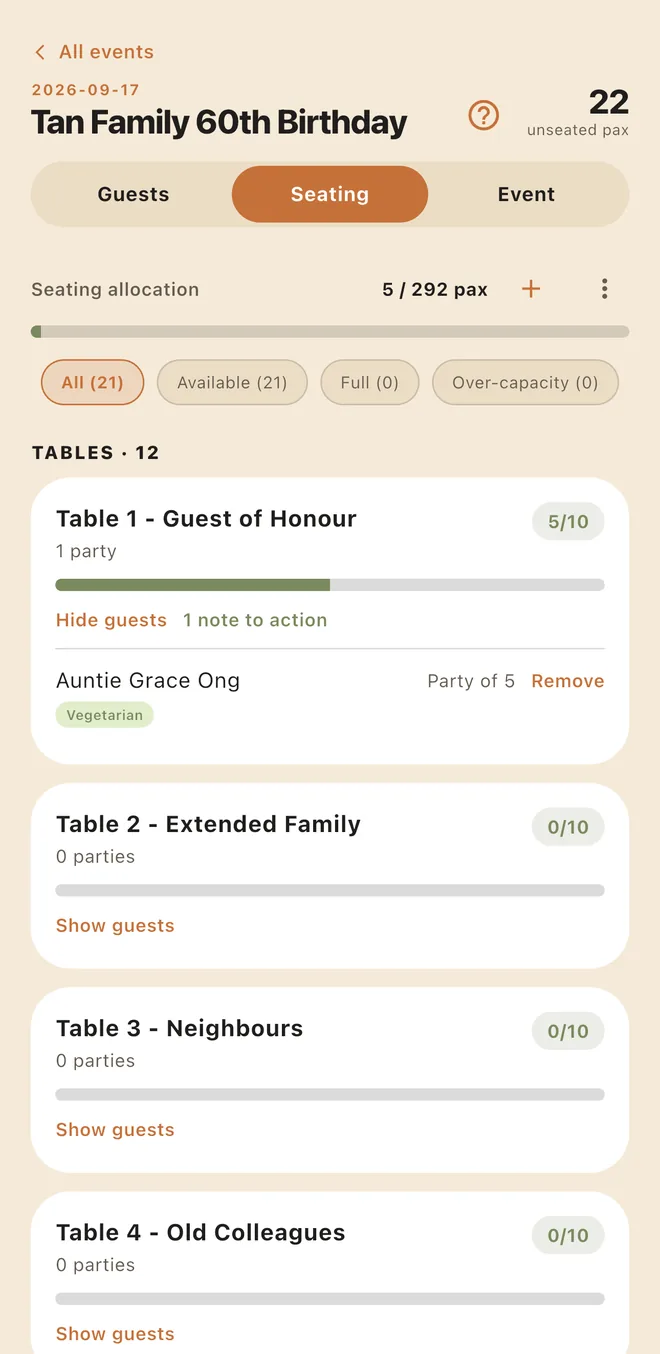
01
Every table at a glance
Twelve tables, how full each one is, and how many pax are still unseated — all on the first screen.
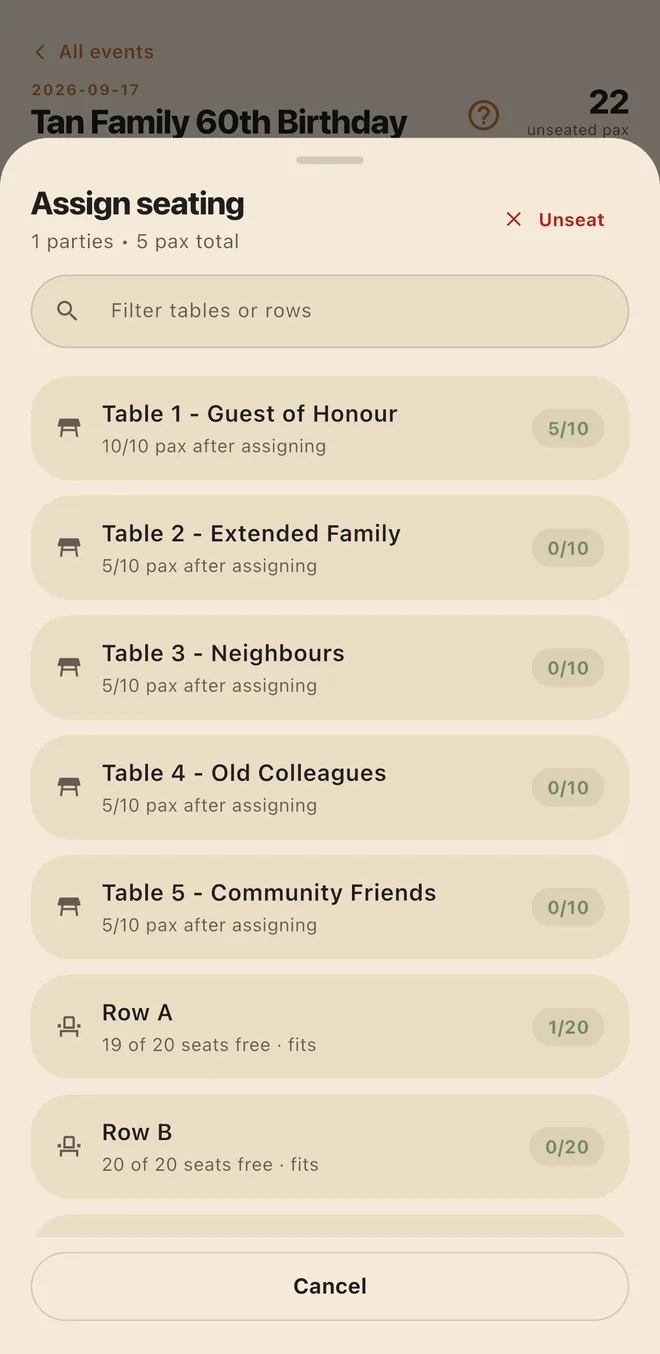
02
Seat a party in two taps
Pick the guests, pick the table. Capacity warns you before a table goes over, and never blocks you.
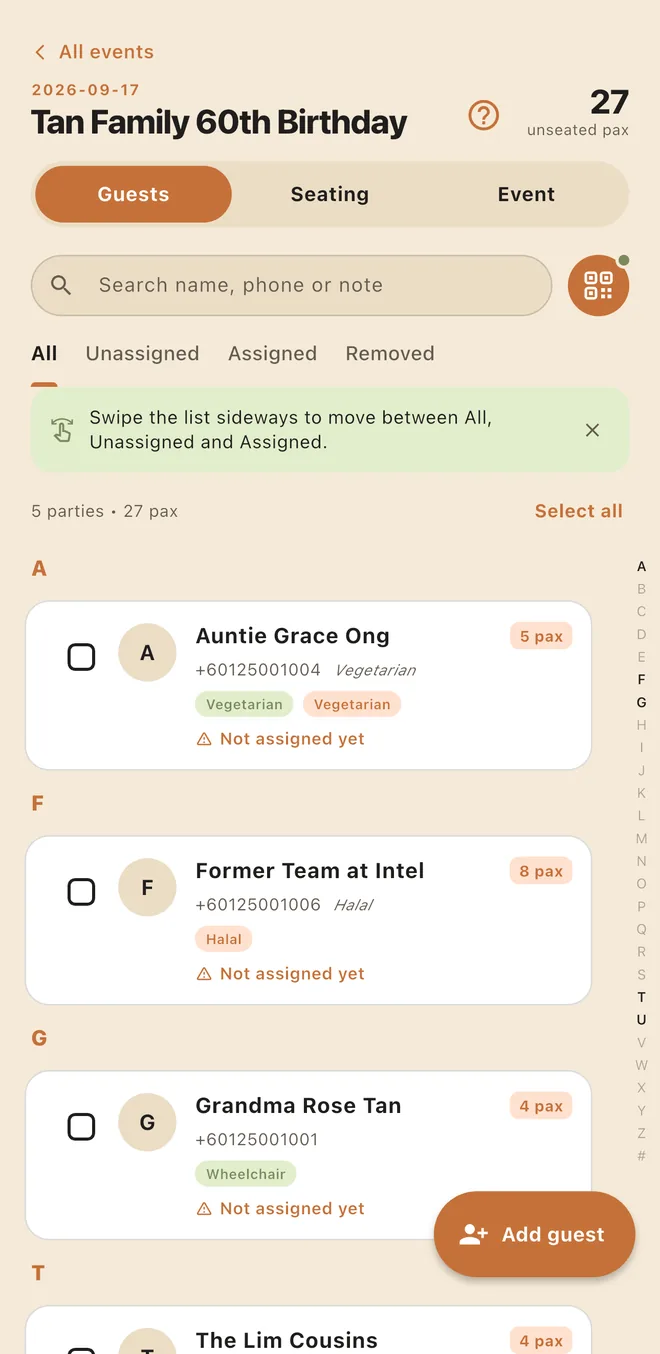
03
Find anyone instantly
An A–Z directory with search by name or phone, pax chips, and seating notes on the row itself.
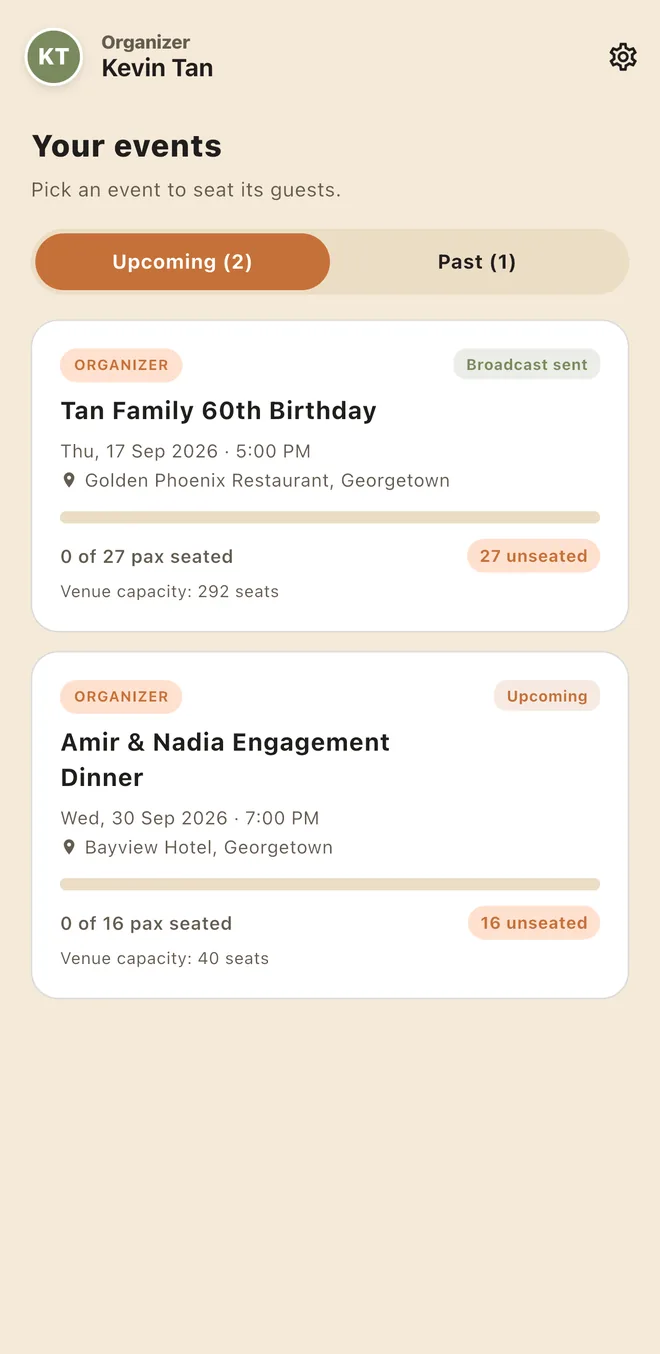
04
Run several events at once
Each event keeps its own guest list, tables and reminders, so last week's dinner never mixes with tonight's.
Swipe to see more screens
For your guests
If they can read a WhatsApp, they're ready.
From teenage cousins to great-grandparents, nobody has to learn anything new. The only thing guests notice is that they didn't have to queue.
Reminders are sent through Meta's official WhatsApp Cloud API from a local Malaysian number, not an unofficial bulk-sender that gets numbers blocked.
No app to download
RSVP is a simple web form that opens from any invite link.
No QR code to dig up
Nothing to screenshot, scan or show at the door.
No login to remember
Guests never create an account or type a password.
FAQ
Common questions.
Do my guests need to download an app?
No. Guests RSVP through a web link and receive their table on WhatsApp. There is nothing to install and nothing to sign in to. Only you and your helpers use the PreSeated app.
When do guests get their table reminder?
Between 3 and 5 hours before your event starts, so it's fresh in their minds on the way over. Sending is locked outside that window, so a half-finished seating plan can't go out by accident.
Can I change the seating at the last minute?
Yes. Move parties between tables from your phone right up until reminders go out, and your helpers always work from the latest plan.
What about guests who don't RSVP or aren't on WhatsApp?
Send us the list you already have and it can be imported, so those guests are seated like everyone else. We also suggest keeping one printed seating sheet at reception for walk-ins.
Will the WhatsApp messages be treated as spam?
Reminders are sent through Meta's official WhatsApp Cloud API with an approved message template and a local Malaysian number, rather than an unofficial bulk-sending tool that risks getting blocked.
Can my team help on the day?
Yes. Add helpers by their mobile number. They get a simple check-in view on their own phone and tick guests off as they arrive.
How much does PreSeated cost?
It depends on your guest count and what you need. Send us a WhatsApp with your event date and estimated headcount and we'll come back with a quote.
Planning a banquet? Let's get everyone seated.
Tell us your event date and rough guest count. We'll reply on WhatsApp with a quote and a quick walkthrough of how PreSeated would work for your event.